Publication notifications
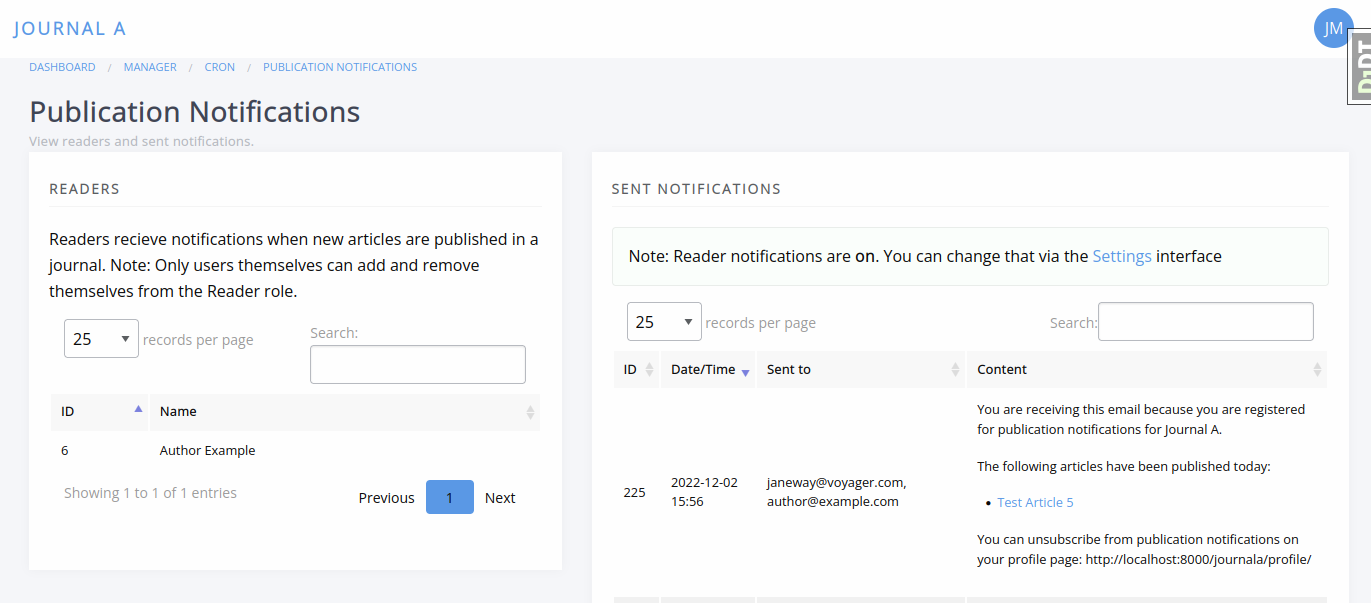
Publication notifications pageJaneway supports publication notifications through the Reader role. This feature allows users to receive email notifications when new articles are published in a journal.
Publication notifications can be enabled or disabled on a per-journal basis. When enabled, any user with a Janeway account can opt in to receive notifications via their profile page.
This feature is designed primarily for continuous publication workflows, but also works for journals that publish complete issues.
Enabling publication notifications
Enabling publication notifications sectionJournal staff can enable or disable publication notifications from the Manager dashboard (Manager > Publication notification (readers)). On this page, use the toggle or link displayed on that page to enable or disable the feature for the journal.
Once enabled, users will be able to subscribe to notifications from their profile.
Subscribing to notifications
Subscribing to notifications sectionUsers can sign up for publication notifications by:
- Logging in to the journal.
- Opening the account menu in the top-right corner of the screen.
- Selecting Edit profile.
- Enabling publication notifications (Reader role).

The Reader role is not a workflow role and does not grant access to editorial or journal management features. It is used only to manage publication notification preferences.
For more information about roles, see Roles and permissions.
How notification emails are sent
How notification emails are sent sectionPublication notifications are sent as a daily email digest:
- All articles published on a given day are included in a single email.
- If no articles are published on a particular day, no notification is sent.
- Emails are sent using BCC, so recipients do not see other subscribers' email addresses.
Reader notifications are logged in Janeway, but they are not associated with the respective articles, so they do not show up in an article’s logs.
Users with access to the admin area can view reader notification logs by selecting the appropriate journal as the log target and “Publication Notification” as the log type.