Roles and permissions on Janeway
Roles and permissions on Janeway pageThis page explains the different roles available in Janeway and how permissions are managed.
Janeway roles
Janeway roles sectionJaneway has a variety of roles available that can be assigned to users, some of which will affect the permissions of the user. Roles do not exclude each other, e.g. having one role will not prevent you from having another one.
-
Author
Assigned automatically when a user registers with a journal or submits an article. This can be considered the "base role". -
Reviewer
-
Editor
Editors handle processing of articles and assignment of tasks. An editor has access to the journal workflow, manager dashboard and journal settings, certain plugins and is able to do general journal management. An editor does not have access to the admin area, press level settings and certain plugins. -
Journal manager
Journal managers have a similar level of permission to the editor role, but can be given additional access (see below). -
Section editor
Section editors have access only to the workflow elements of articles assigned to them. They cannot access any articles not assigned to them, journal settings or plugins. This role is well-suited for editors who only need to handle specific articles within the journal, such as guest editors. -
Copyeditor
-
Typesetter
-
Proofreader
-
Reader
This is not a role as such, but it is used to indicate whether a user is signed up for article publication notifications. For more information, see Email notifications
Note
Whilst the Production manager and Proofing manager are still assignable in Janeway, they have been deprecated in 1.4 and are no longer in use.
Permissions
Permissions sectionIn addition to the roles and their respective permissions, separate permission levels can be assigned for certain settings for journal managers and editors. Editors also have specific permissions associated with their roles.
Editor permission
Editor permission sectionEditors can:
- Manage roles within their journal.
- View and edit account activation status for journal users.
- Edit basic account information on behalf of users.
-
View a user's assignment history (editorial, review, proofing, etc.).
- The user history page also displays emails sent directly to the user - excluding 'automated' emails such as reminders, notifications and invitations.
Staff permission
Staff permission sectionStaff permission should only be assigned to press-level users (for example, publishers or system administrators). It can only be granted by another user with staff permission.
Staff users can:
- Perform all editor-level actions across all journals in the press.
- Merge duplicate user accounts at press level.
- Use all installed plugins.
- View additional manager pages (for example: inactive users, authenticated users).
- View the All articles page.
- Access the Admin area.
Superuser permission
Superuser permission sectionSuperuser status allows a user to bypass most role-based permissions restrictions. This effectively allows the user to see most views in Janeway.
There are some cases that superusers cannot access a page. For example, sometimes Janeway only gives access if the user is assigned to a particular task, or if the user was sent particular contact message.
Granular manager permissions
Granular manager permissions sectionJaneway allows more granular permissions for journal managers and editors, using the Permission setting group. This can be configured through the All settings page, found on the Manager dashboard, and searching for "Permission"
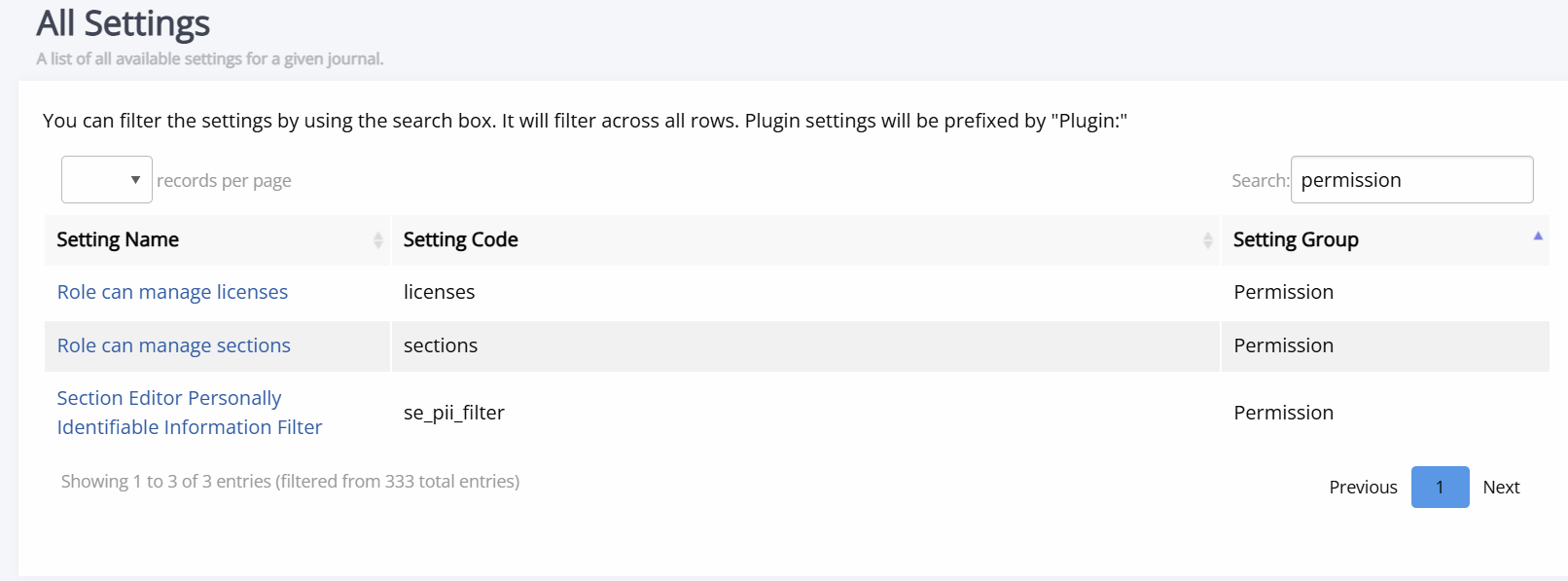
This can be used on the configuration of licences and sections as following:
-
Licences
Permissions control whether users can access the licences control pages based on their roles, defaulting to Editor and Journal manager. -
Sections
Permissions control whether a user can access the sections control pages based on their roles, defaulting to Editor and Journal manager.
Editing granular permissions (staff only - advanced)
Editing granular permissions (staff only - advanced) sectionNote
The following sections contain information on configuring granular permissions. This requires more advanced technical knowledge, though you are unlikely to need this (often).
There is no interface for updating the roles that can access the licences and sections pages and the setting is JSON stored in the database. If you are not comfortable or able editing this, contact your system administrator.
Warning
Only modify granular permissions if you are confident in the change you are making.
By default, both settings read ["editor", "journal-manager"]. If, for example, you wanted to stop editors from editing licences, you could change it to read ["journal-manager"]. Once saved, only users with the journal manager role will be able to access the licences
pages.
Granular settings permissions (advanced)
Granular settings permissions (advanced) sectionUsers with staff permission can control which roles can view and edit individual settings via the Admin area (Core > Settings), using the editable_by field.
If a setting is displayed on a settings group page (for example, the General or Submission settings page) and a user does not have the appropriate permission to edit that setting, it will be hidden from the form.
By default, setting permissions are only editable by editors and journal managers. When upgrading to a Janeway version with the granular permissions, no changes will be made to the default.
If you wish to make these changes and are not confident using the Admin interface, contact your system administrator.