Setting up a repository with Janeway
Setting up a repository with Janeway pageAbout Janeway repositories
About Janeway repositories sectionJaneway supports hosting repositories for preprints, postprints, field reports, and other publication types within the same press environment as journals.
Navigating the Janeway repositories
Navigating the Janeway repositories sectionRepository manager
Repository manager sectionYou can view unpublished preprints, preprint stats and published preprints.
Preprint stats
Preprint stats section- High-level stats overview
- From here you can navigate to rejected preprints, versions awaiting moderation, orphaned preprints, and the reviewer management page.
Getting started
Getting started sectionThe first step is to enable the repository system in the press-level settings:
- Go to the Press manager.
- Open Edit press details.
- Tick the Enable repository system box and click Save.
- Return to the Press manager.
- The Add a new repository option appears below the list of journals.
Click it.
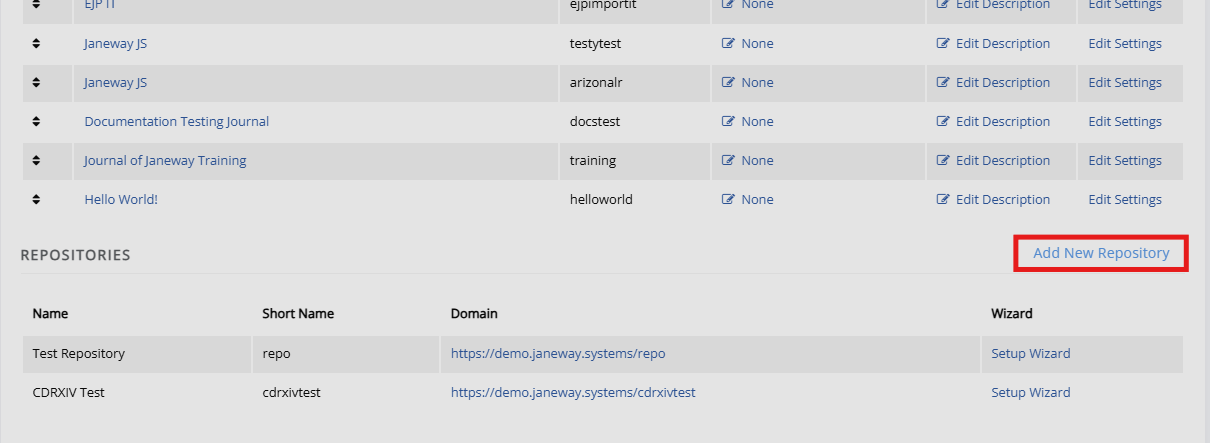
- This opens the repository set-up wizard. See Repository settings for more information.
Other settings
Other settings sectionSubjects
Subjects sectionOn this page, you can create subjects to be used in the repository. These can be organised hierarchically, with child subjects; for example, "Biology" and "Marine biology". Subjects are grouped together, with the parent subject listed first.
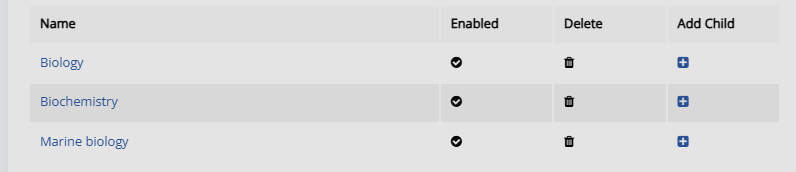
You can also select editors who will be notified of submissions made to this subject.
Licences, additional fields, subjects.
Coming soon
Linking a repository and journal
Linking a repository and journal sectionComing soon