Contributing to Janeway documentation
Contributing to Janeway documentation pageWork-in-process note: This page could explain how people including us and our clients should contribute documentation. It would need several sections, including what style to write in, using GitHub effectively, and how the docs are organized, but to get started, we just have a section on how to name files and folders.
Creating and editing pages
Creating and editing pages sectionAll the pages of the support site are generated from text files stored under
content/pages/support/ in this repository. Old documentation can be found at
content/old-docs/ while the support site is being built.
Pages for the support site should be written in GitHub-flavored Markdown (GFM).
Image files should be added under content/pages/support/images/. All the content
can be edited on GitHub, so that you can make use of the Preview tab in GitHub.
When creating Git commits, create a dedicated branch if you are working in
a code editor on your computer, or commit them to the perpetual branch
copyediting if you are working on GitHub.com, and open pull requests
into main from the branch you committed to. If you need help
with anything related to commits, branches, or pull requests, please get
in touch with our developers.
Naming files and folders
Naming files and folders sectionAll text and image files and folders should be named with standard naming conventions so they are easily usable on the web.
Do:
- use dashes to separate words in the file names
my-folder/my-file-name.txt
Don't:
- use spaces (reason: shell scripting)
- use capital letters (reason: avoid broken links)
- use underscores (reason: search engine optimization)
- use special characters (reason: hyperlink parsing)
  my folder/my file name.txt
  My-Folder/My-File-Name.txt
  my_folder/my_file_name.txt
  my&your-folder/my&your-file-name.txt
Headings
Headings sectionInclude a top-level heading for each page, using the single hash in Markdown syntax.
For example:
# Contributing to Janeway documentation
Internal links
Internal links sectionIf you want to link to another page in the documentation, use Markdown's link syntax, but leave the extension off the file, since eventually it will be an HTML file, not a Markdown file. For example, to create a link to this file from another file in the same folder, you can do this:
Check the [contributing guide](contributing-guide) for instructions.
Code formatting
Code formatting sectionUse the backtick character ( ` ) to set off bits of code, like this:
Set the setting to `True` for this behavior.
When the code includes Jinja or Django template syntax like {{ article.variable }}, you also have to book-end that code with
Jinja instructions to ignore it and leave it unprocessed as raw code. Like
this:
`{% raw %}{{ article.variable }}{% endraw %}`
This will be displayed as:
{{ article.variable }}```

This is known as “escaping.” See the [Jinja
documentation](https://jinja.palletsprojects.com/en/3.0.x/templates/#escaping)
for more details.

## Lists with definitions

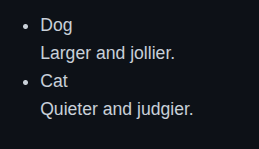
You may want to list things and give a sentence or two of text with each one to define or explain it. You can form this kind of list in Markdown with the use of spacing and line breaks.

```md
- Dog _space_ _space_
  Larger and jollier.
- Cat _space_ _space_
  Quieter and judgier.
Do not put any bullet or dash before the definitions, because this will cause extra friction for users with screen readers.
Importantly, put two spaces after the term in the first line, to maintain the line break when the Markdown is rendered.
Images
Images sectionImages should be placed in their own Markdown paragraph, with a line space before and after. This will ensure they display large enough, rather than being limited to the width of the surrounding text.
This dog is jolly.

This cat is judgmental.

Images in lists should be indented to the same level as surrounding text, so that it’s clear visually they relate to the list item rather than coming after the end of the list. They should also have a line space before and after.
1. Dog

More about the dog
2. Cat

3. Bird